
Let's talk about AI: #2 The top 5 AI tools for technical writers
Length:
7 min
Published:
June 7, 2023
Want to simplify your workflow and improve your technical writing at the same time? In this article I will walk through the AI tools that changed how I see my own role in the tech industry. They will ease your workload and lift your productivity whether you are a seasoned pro or just starting out.
#5 Make writing easier: Jenni
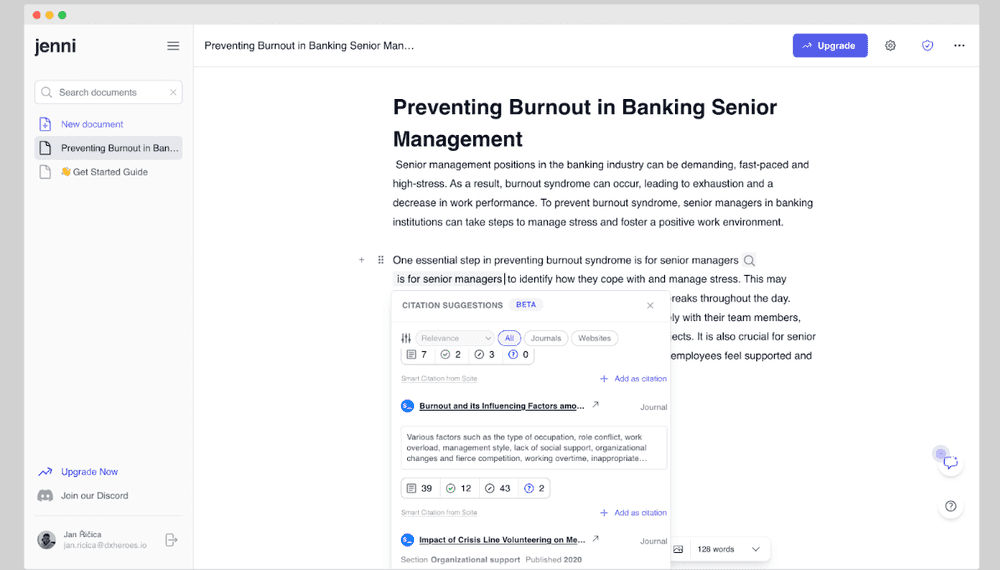
Jenni helps you draft technical documents and articles. You give it as clear and structured a brief as you can, and Jenni writes the wording it thinks fits best.
You can take the text as is, edit it, or ask for alternatives. Jenni gets you a draft fast, which is a great starting point for technical and content writing. What I like most is highlighting a passage and asking for a reference. Jenni scans the web for relevant citations and pulls them in for you, and if you like some, you can drop them straight into your document. That pushes your writing up a level.
Jenni is great when you need help with your text or just some ideas. It is still only an AI tool, so it will not always explain things the way you want. Like every other AI here, treat it as an extra advantage, not the final word. You stay the last link in the chain.
#4 Do not waste a minute: Bearly
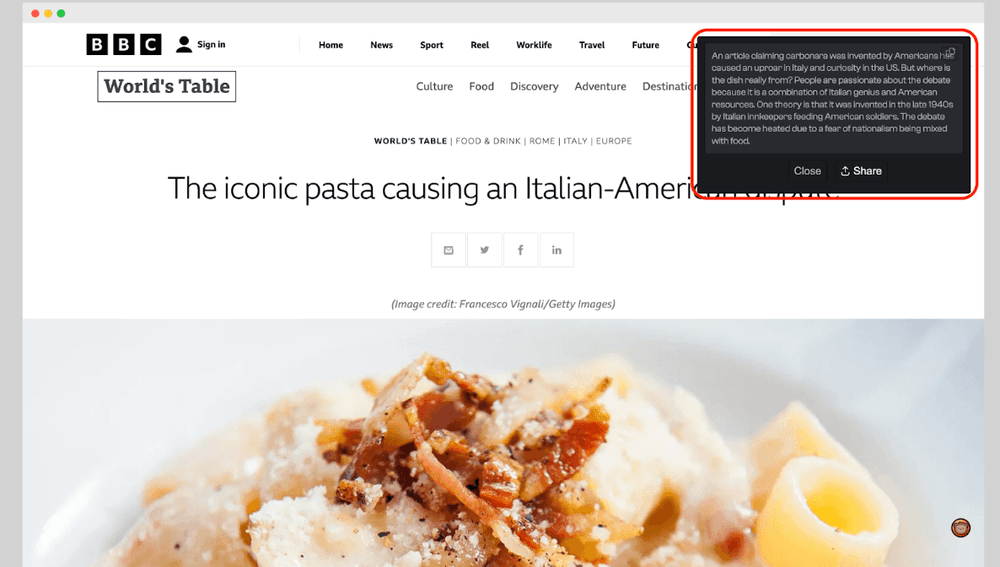
Bearly is great for productivity, because it lets you use several AI tools at once. You can generate graphics, ask questions, or check your grammar. My favorite feature is summarizing. That helps a lot today, when there is too much information everywhere. I spend a lot of time gathering knowledge for my work, but the articles are sometimes long and messy, and it gets frustrating when I cannot find what I am looking for. Bearly steps in and saves me time: its model reads the article and produces a summary of the whole text.
In a world flooded with information, Bearly saves you time and tells apart what deserves your attention from what does not.
#3 Listen to your clients: Fireflies
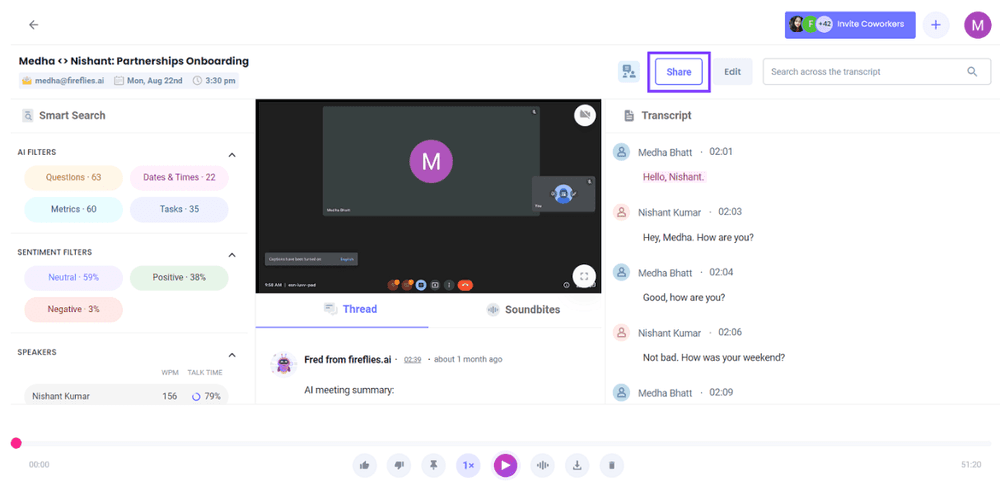
You probably know the moment: you join a meeting and everyone tries to figure out who will split their attention and take the notes. Catching every key point, summarizing the next steps and goals, and still paying attention is hard, and most people would rather skip it. Fireflies is the meeting assistant happy to do it for you.
Fireflies joins your meeting on almost any online platform and starts taking notes right away. It recognizes speakers, records a transcript, and summarizes the whole meeting along with the actions to take next. By listening to the voices, it even tracks how many questions came up and how the meeting was run. With this tool you focus on what matters: your clients and your coworkers.
#2 A presentation with a native AI speaker: Synthesia
My favorite tool. Synthesia lets you generate video presentations of your products with a talking bot. You pick from more than 20 characters in more than 40 languages and dialects. With its advanced editing, Synthesia is a real help for new video content, in a world where this kind of media is becoming the default.
It shines when you need to describe a use case or show a technical approach. You only write a transcript, and the recording happens inside Synthesia Studio, which makes your work much simpler.
Synthesia Studio works a lot like PowerPoint. You lay out the steps and add animations and transitions to build a more polished presentation. It is simple enough that you do not need any advanced technical skills.
You also keep full control over the details, down to adding vocal pauses to the speech. You can even adjust the bots' facial expressions to make it look more realistic.
Check it out: Synthesia - Create AI videos by simply typing in text.
#1 No surprise: ChatGPT
This one is no surprise, and you have surely heard of ChatGPT by now. After using it for a while, though, I can say it is not right for every task and you should not reach for it blindly. GPT sometimes bends the facts to make the output look better, even when there is barely any truth in it.
In my view, GPT is genuinely handy for low-level code work, which is what I use it for. When I change an OAS, I sometimes have GPT review my specs. I have used it to rewrite parts of a specification from one format to another, and it works great. I also ask it to translate from human language to programming languages and to handle other small tasks.
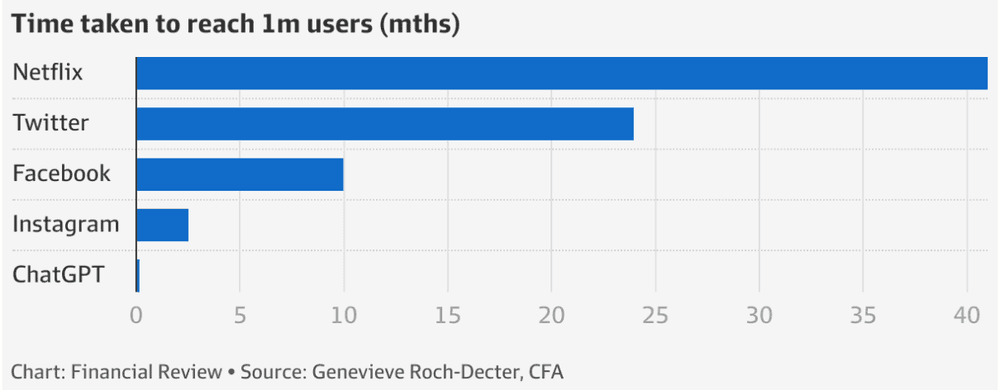
I also use it for feedback on my writing, to point out my mistakes and check whether I am being consistent. After all, GPT is a language model with a huge online knowledge base and more than 100 million users.
Work smart, not hard
As a technical writer, these AI tools can make your job easier and more effective in a few ways:
- Content creation: AI helps you research and write faster by pulling together data from many sources in a few clicks.
- Content improvement: it helps you write better by suggesting alternative phrasing, explaining technical terms, and checking your grammar and spelling.
- Personalization: AI helps you understand your audience and write content that speaks directly to them.
- Automation: by automating tedious tasks, you free yourself for the more important and creative parts of the job.
In short, AI can streamline and improve a lot of a technical writer's work, from creating and updating documents to reviewing and editing them, which raises the quality of the documentation and makes the process more efficient.
That said, and this matters, AI tools are still just tools. As I said at the start, you have to stay at the end of the chain. Lean on them alone and you may not get the result you want. AI often misreads the task or wanders off to somewhere you did not want to go, and you can end up handing in work that misses the requirements entirely. So do not put all your eggs in one basket, and trust yourself and your work above all else.
Related reading
You might also be interested in:
- Let's talk about AI: #1 The yin and yang of AI - Explore the dual nature of AI - its tremendous benefits and the challenges it presents.
- Let's talk about AI: #3 AI-Powered Solutions for Real-World Challenges - Learn how to use AI technologies to optimize performance on a variety of tasks.
Want to stay one step ahead?
Don't miss our best insights. No spam, just practical analyses, invitations to exclusive events, and podcast summaries delivered straight to your inbox.